

Mac Mini M6 and M5 Pro storage is soldered again
The short answer is no: storage in the 2026 Mac Mini with M6 or M5 Pro is not on the removable module used by the 2024 M4 generation. Firsthand internal photographs show the NAND back on the logic board, and Apple's own service-parts list reaches the same conclusion from another direction. Our M4 storage module therefore does not fit either new machine. If you own an M4 Mac Mini, nothing changed; this article is about the models Apple released in September 2026.
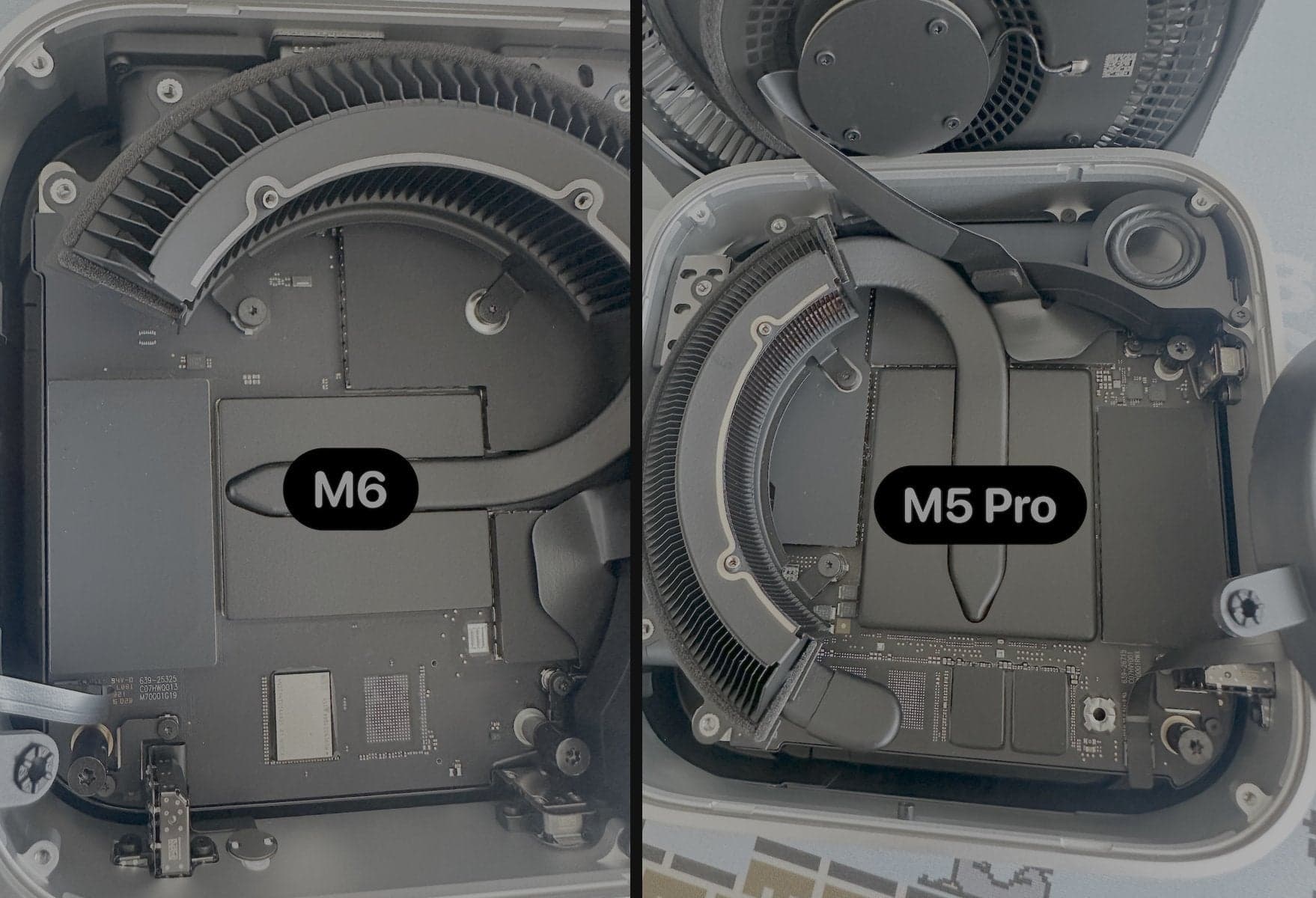
First, the names: M6 and M5 Pro, not M5 and M6
Apple announced this Mac Mini generation on 25 August 2026 and began selling it on 22 September. The two choices are the base Mac Mini with the new M6 chip and the higher-end Mac Mini with M5 Pro. There is no base-M5 Mac Mini in this release (apple.com/newsroom/2026/08, checked September 2026). That naming matters when checking compatibility: a listing that says only “M5 Mac Mini” may be referring loosely to the M5 Pro model.
Both machines keep the same compact enclosure introduced with the M4 generation, but a familiar outside does not guarantee the same internal storage connection. Compatibility follows the logic board and connector, not the case shape or the year printed in a shop listing.
What the teardown shows
On release day, retail M6 and M5 Pro machines were opened and photographed side by side. Neither logic board has the socket and separate NAND board found in the M4 model. The NAND packages are attached to the main logic board instead. The photograph above is useful because it is direct evidence from shipping hardware, not an inference from an announcement or an early render.
The absence of a slot is the decisive compatibility fact. The M4 upgrade sold here is a small raw-NAND board shaped for the M4 connector. It is not a conventional M.2 drive, and there is nowhere to insert it in either 2026 model. Do not buy an M4 or M4 Pro storage module for an M6 or M5 Pro Mac Mini.
A same-day 9to5Mac report independently checked the finding against Apple's repair documentation and reached the same conclusion (9to5mac.com/2026/09/22/m6-mac-mini-upgrade-storage-change, checked September 2026). It is useful corroboration, but the teardown photograph and Apple's parts lists below carry the claim.
Apple's repair guides make the generational change unusually clear
Apple's 2024 Mac Mini exploded view names “11. SSD module (flash storage)” as a separate orderable part. It lists individual module numbers for 256GB, 512GB, 1TB and 2TB on M4, and 512GB through 8TB on M4 Pro (support.apple.com/en-us/121008, checked September 2026). The logic-board part numbers alongside it vary by chip, memory and Ethernet option, but not by storage. That is exactly the service structure expected when flash storage lives on a removable module.
The M6 or M5 Pro exploded view has no item 11 and no SSD module anywhere in its orderable-parts list. Item 12 is the logic board, and every logic-board part number now includes a storage capacity alongside the CPU, GPU and unified memory: for example, M6 boards are listed with 256GB, 512GB, 1TB or 2TB, while M5 Pro boards carry 512GB through 8TB (support.apple.com/en-us/127958, checked September 2026). Apple's own service unit therefore combines the board and storage.
That comparison is stronger than saying the slot merely moved under a shield. In 2024 Apple sold the SSD module as a separate service part; in 2026 it ties capacity to the logic-board SKU. It does not mean every component in the computer is unrepairable. Apple still lists fans, ports, the power supply and complete logic boards as service parts. It means storage is no longer the small, separately replaceable assembly it was on M4.
| Apple repair-parts guide | Storage part | Logic-board listing | Aftermarket module path |
|---|---|---|---|
| Mac Mini (2024), M4 or M4 Pro | Separate SSD module, item 11 | Chip, memory and Ethernet; storage listed separately | A model-specific raw-NAND module can be replaced |
| Mac Mini (2026), M6 or M5 Pro | No SSD-module item | Chip, memory and storage capacity combined in each board SKU | No slot for the M4 module |
Soldered NAND is not the same thing as a standard SSD
Apple silicon contains the storage controller. On the M4 Mac Mini, the removable board carries raw NAND flash rather than a complete off-the-shelf NVMe SSD with its own controller. A DFU restore from a second Mac prepares replacement NAND for that Mac. The 2026 design moves those flash packages back onto the logic board, removing even that model-specific module boundary.
Calling the chips “soldered storage” describes the practical upgrade limit, not a claim that board-level semiconductor work is physically impossible. A specialist with microsoldering equipment may investigate techniques that are far beyond a supported customer upgrade. That is different from buying a module, removing one screw and restoring the Mac. There is currently no supported or demonstrated drop-in internal-capacity upgrade for the M6 or M5 Pro Mac Mini.
Choose the internal capacity at purchase
Apple's current technical specifications list the M6 Mac Mini from 256GB through 2TB and the M5 Pro model from 512GB through 8TB (apple.com/mac-mini/specs, checked September 2026). Those same capacities appear in the capacity-specific logic-board parts, so there is no reason to buy the smallest internal option while expecting an M4-style swap later.
Estimate what must remain internal: macOS, applications, local caches, sleep and update headroom, and files that need laptop-like portability with the machine. Then decide what can live externally. Paying for more internal storage at order time is the only straightforward internal-capacity choice Apple currently documents for these models.
| 2026 Mac Mini | Internal storage options | Can this shop's M4 module fit? |
|---|---|---|
| M6 | 256GB, 512GB, 1TB or 2TB | No |
| M5 Pro | 512GB, 1TB, 2TB, 4TB or 8TB | No |
| M4 (2024) | Separate model-specific module | Yes, for the base M4 product sold here |
External storage is the practical expansion route
Soldered internal flash does not cap total storage. Apple equips both new models with fast external I/O, and the M5 Pro model uses Thunderbolt 5. Apple's launch material quotes transfer capability up to 120Gb/s for Thunderbolt 5 accessories, including external storage (Apple Newsroom, checked September 2026). A suitable NVMe enclosure can hold large project libraries, media, backups or local-model files without opening the Mac.
External storage has different trade-offs: another enclosure and cable, power and sleep behavior to test, and no expansion of the sealed boot volume itself. Performance depends on the drive, enclosure, port and workload; a headline interface rate is not a promise that one external SSD sustains that number. For a desktop that stays on one desk, however, external storage is often simpler than overbuying every internal terabyte. Keep a separate backup whichever route you choose.
What this means for M4 owners and for this store
Nothing about the 2024 M4 hardware changed. Apple's M4 repair guide still lists the removable module, and the compatibility guide explains exactly which machine our product fits. A base M4 Mac Mini remains the supported model for the module sold here.
The 2026 result does end the assumption that Apple had permanently made Mac Mini storage modular. M4 and M4 Pro were a one-generation exception between soldered Apple-silicon designs. We will keep watching later repair guides and real hardware, but compatibility is never carried forward from a previous enclosure. For M6 and M5 Pro owners, the honest answer today is to use the capacity ordered from Apple or add external storage.
Related questions
Can I install an M4 SSD module in the M6 Mac Mini?
What about the 2026 Mac Mini with M5 Pro?
Is there a regular M5 Mac Mini?
Does soldered storage make every repair impossible?
Can I still expand storage externally?
Ready to upgrade?
More guides
- Is the Mac Mini M4 SSD upgradeable?Yes, and this is the first Mac Mini in years where that is true. What the swap involves before you order.
- M4 vs M4 Pro: why the storage module is differentTwo Mac Minis from the same year, two different modules. Check which one you have before you order.
- Mac Mini M4 SSD DFU restore: step by stepThe part of the upgrade that happens on a second Mac. Exact steps, the black-screen moment, and the fixes when nothing appears.